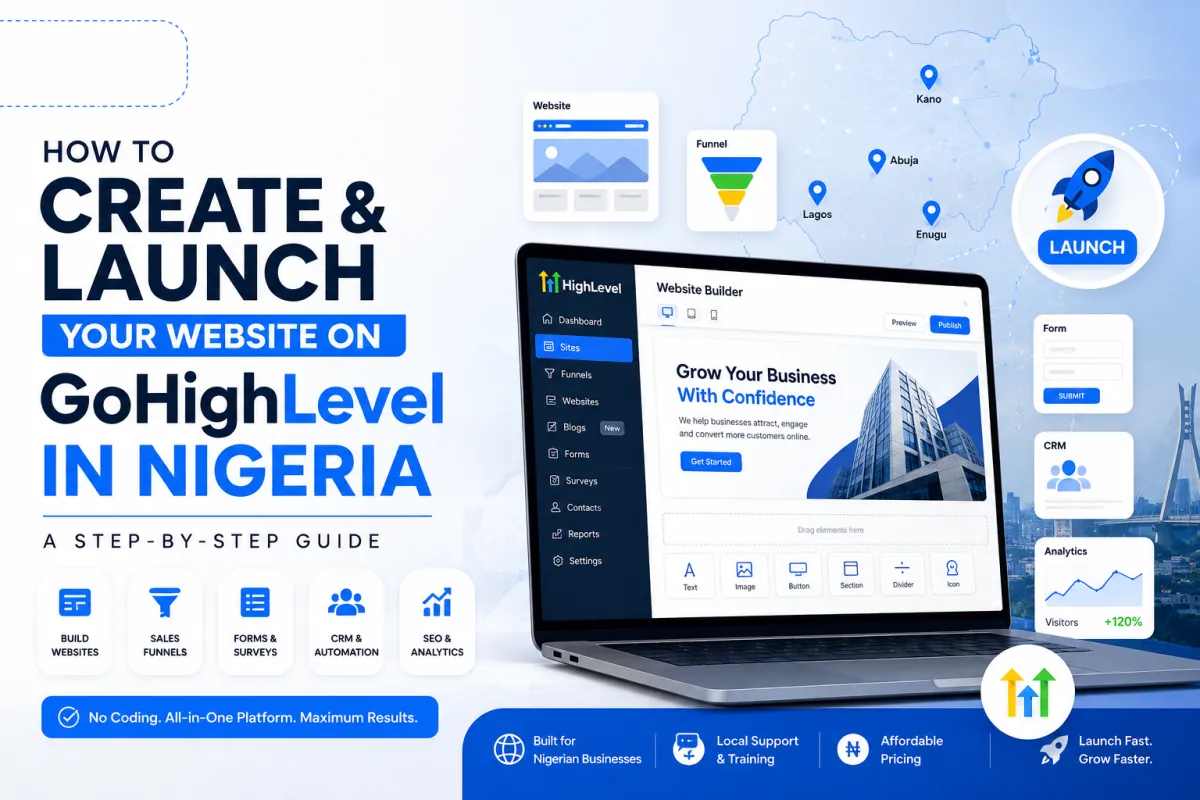
How to Create and Launch a Website on GoHighLevel in Nigeria
If you run a business in Nigeria and you're tired of paying separate fees for a website builder, a CRM, and a booking tool, GoHighLevel solves that problem by putting all three under one roof. You can build a full website, connect it to your leads pipeline, and start collecting appointments without ever leaving the platform.
The tricky part for a lot of Nigerian business owners isn't the concept, it's the setup. Where do you click first? What's a "section" versus a "row"? How do you actually get a phone number working on a button? This guide walks through the entire process, from planning your pages to publishing the finished site, with screenshots at each stage so you know exactly what you should be looking at.
Before You Touch the Website Builder
It's tempting to log in and start dragging elements around immediately. Resist that. A few minutes of planning saves hours of rebuilding later.
Get clear on the purpose. Is this site meant to generate leads, sell a product, take bookings, or simply give people information about your business? A clinic in Lekki booking appointments needs a different layout than a fashion brand selling online. Decide this first, because it shapes every design choice after it.
Know who you're building it for. A logistics company speaking to corporate clients writes and designs differently than a school speaking to parents. Keep your actual audience in mind rather than a generic "everyone."
Sketch your pages before you build them. Most businesses need at minimum a Home, About, Services or Products, and Contact page. A simple table works well for planning:
Page Purpose What Goes On It Home Introduce the business and drive the main action Headline, sub-headline, call-to-action button, hero image, quick overview of what you offer About Build trust Your story, team photos, what makes you different Services/Products Show what you sell Descriptions, pricing, benefits Contact Make it easy to reach you Contact form, phone number, WhatsApp link, address
Gather your assets first. Logo, brand colors, product photos, and at least rough copy for each page. Building a page and hunting for images at the same time slows everything down.
Step 1: Create a Blank Website
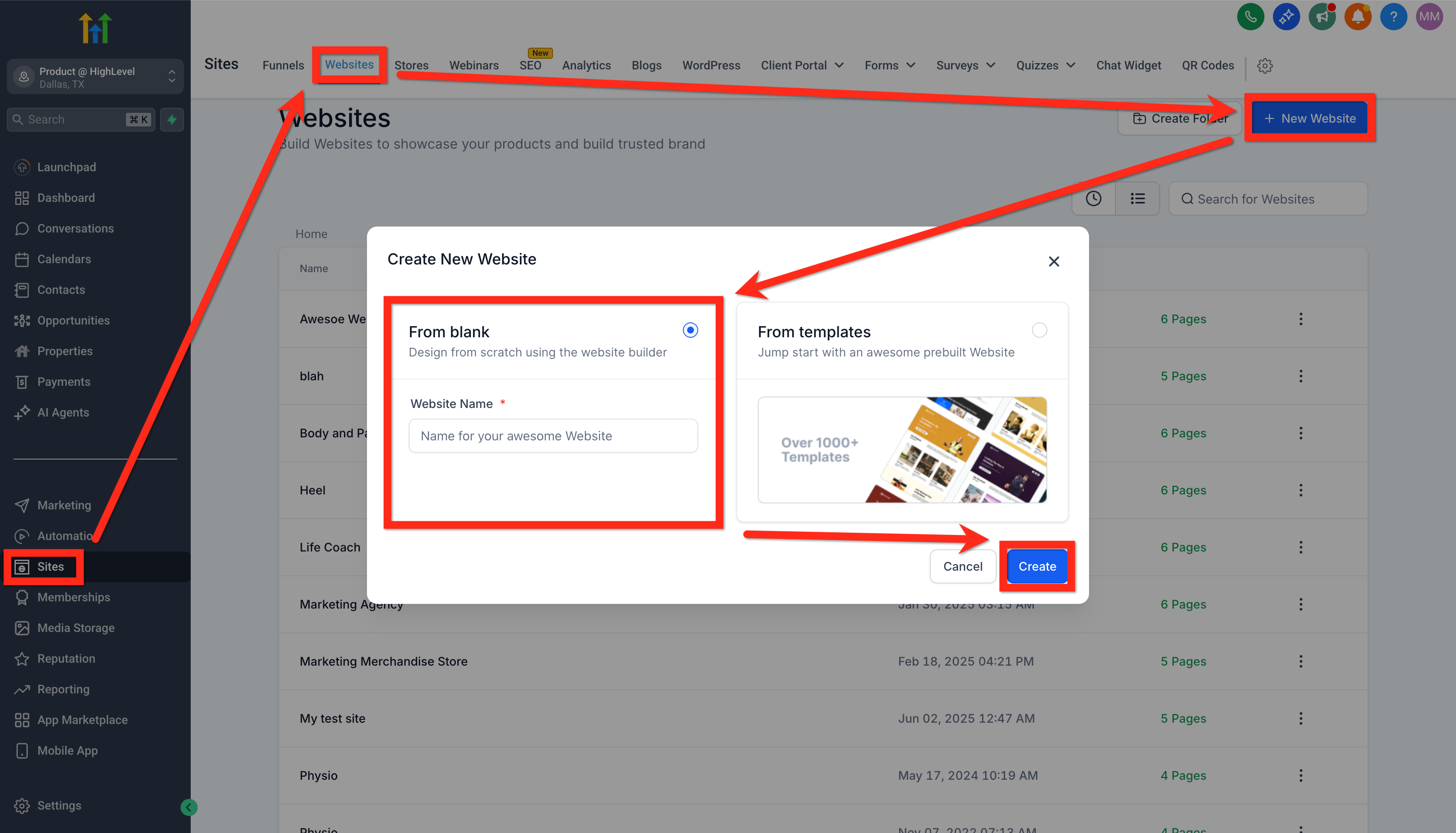
Inside your GoHighLevel account, go to Sites > Websites > New Website, then select From Blank and give the site a name.
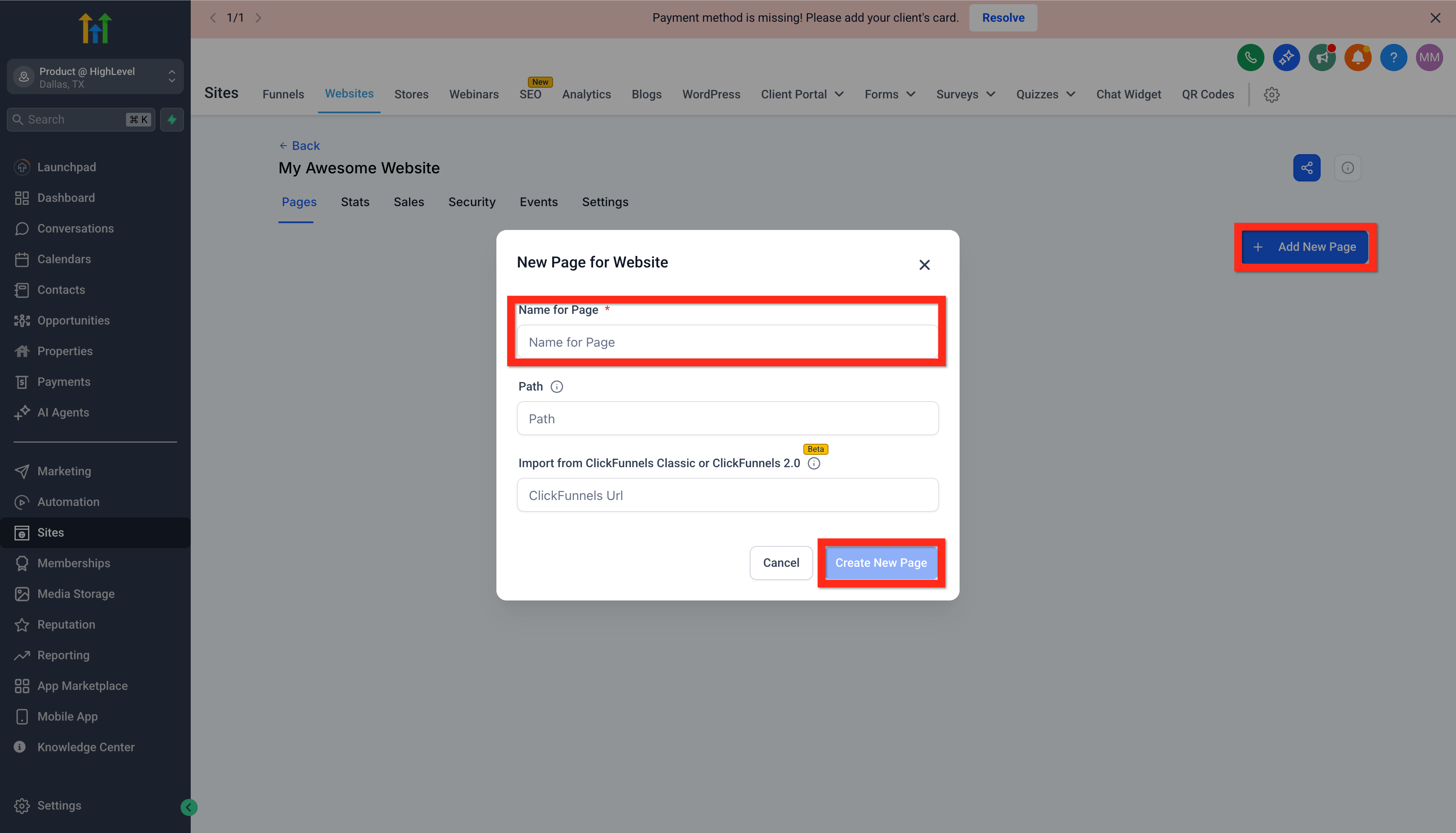
Once the site exists, click Add New Page, type a name for your first page (usually "Home"), and click Create New Page.
Step 2: Open the Page Builder
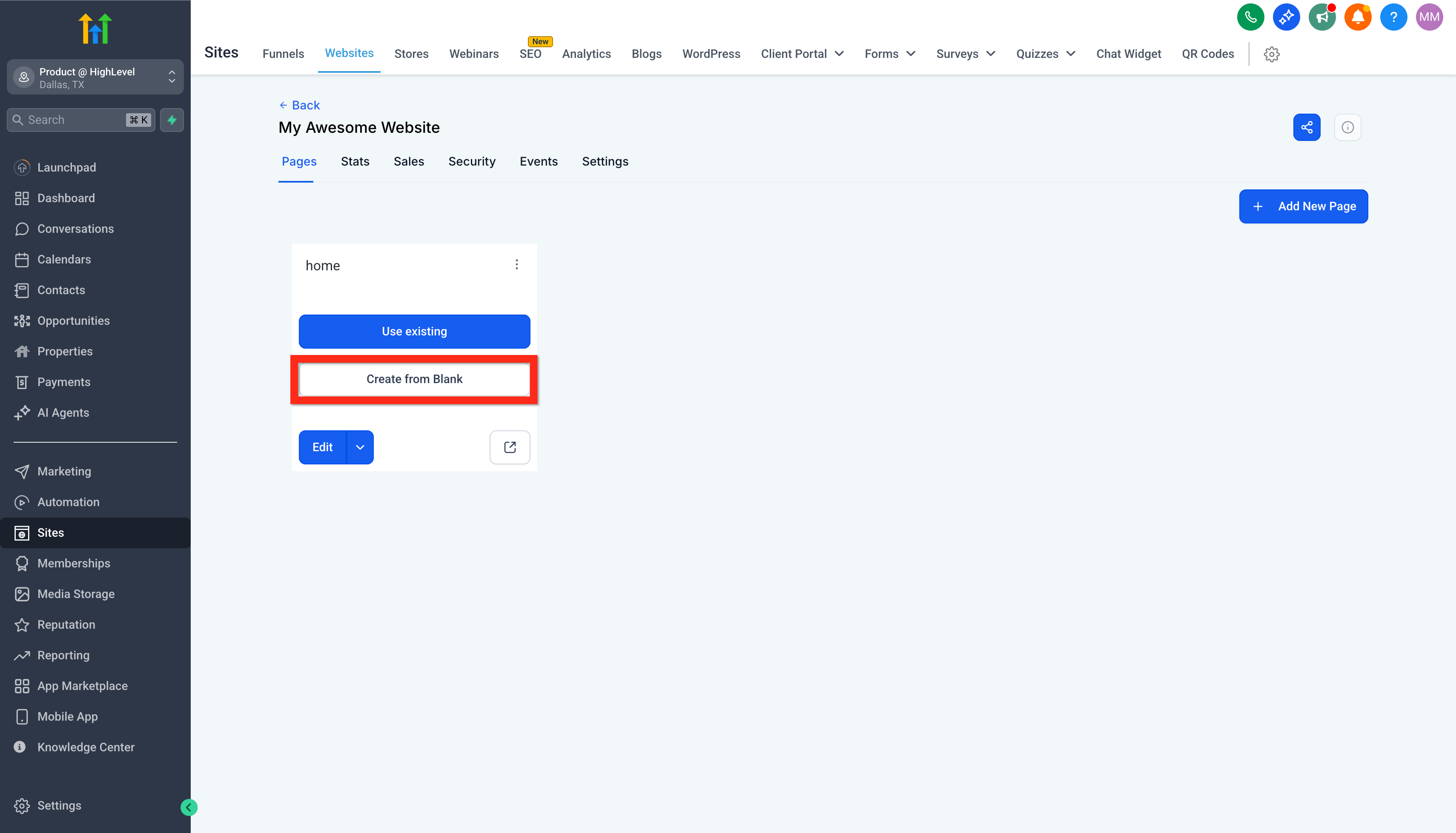
On the page you just created, click Create From Blank to open the visual editor.
This drops you into the website builder, which has six main areas worth learning before you start:
Control panel on the top left, for adding elements, pages, and metadata
Device switcher, to toggle between desktop and mobile view
Meta controls, covering history, undo, preview, save, and publish
Left panel, where sections, rows, and elements live
Center panel, your live editable page
Right panel, settings for whatever section, row, or element you've selected
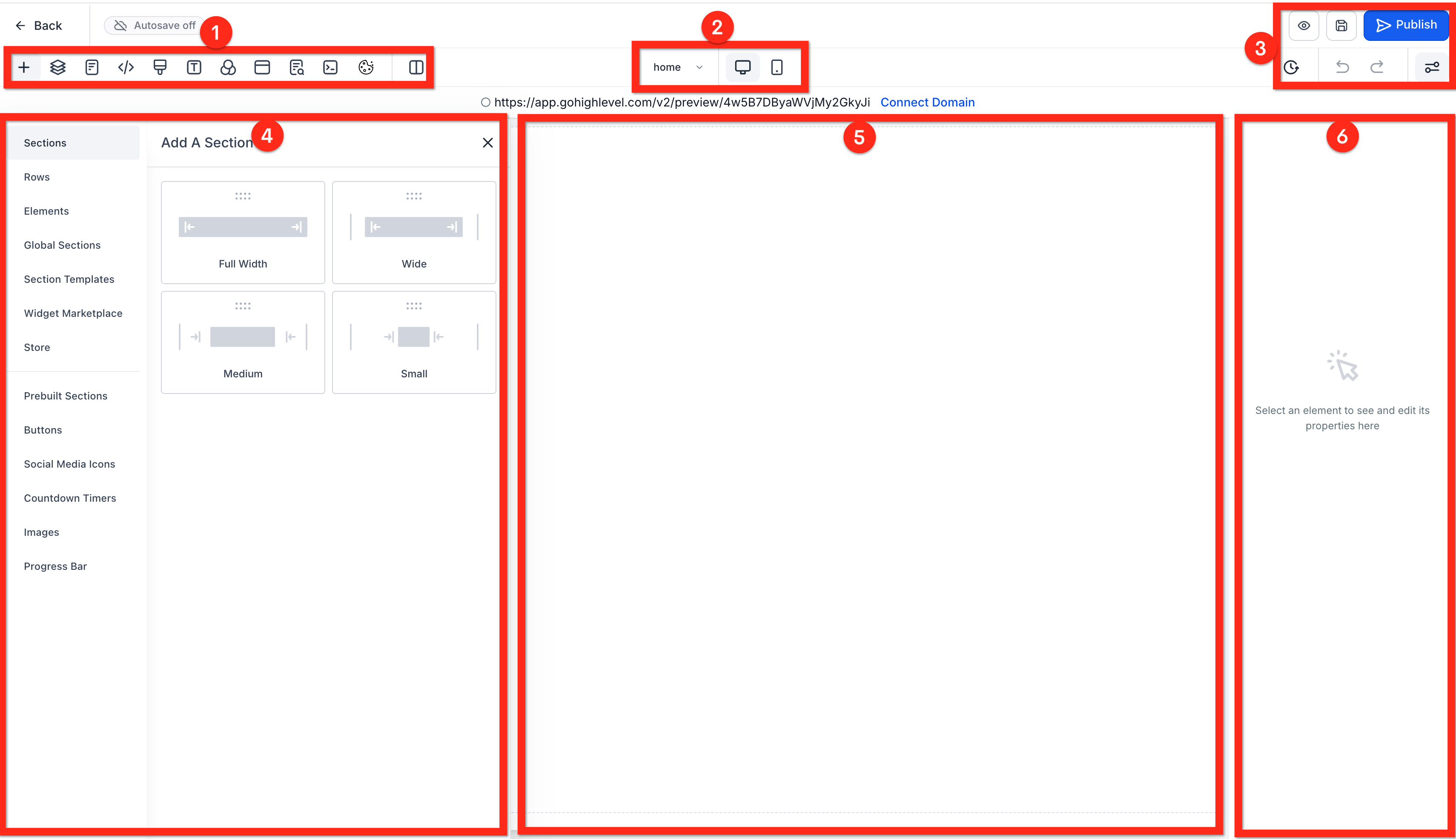
Get comfortable clicking between these before you start building. Everything you'll do on this page happens through some combination of these six areas.
Step 3: Build Your Homepage
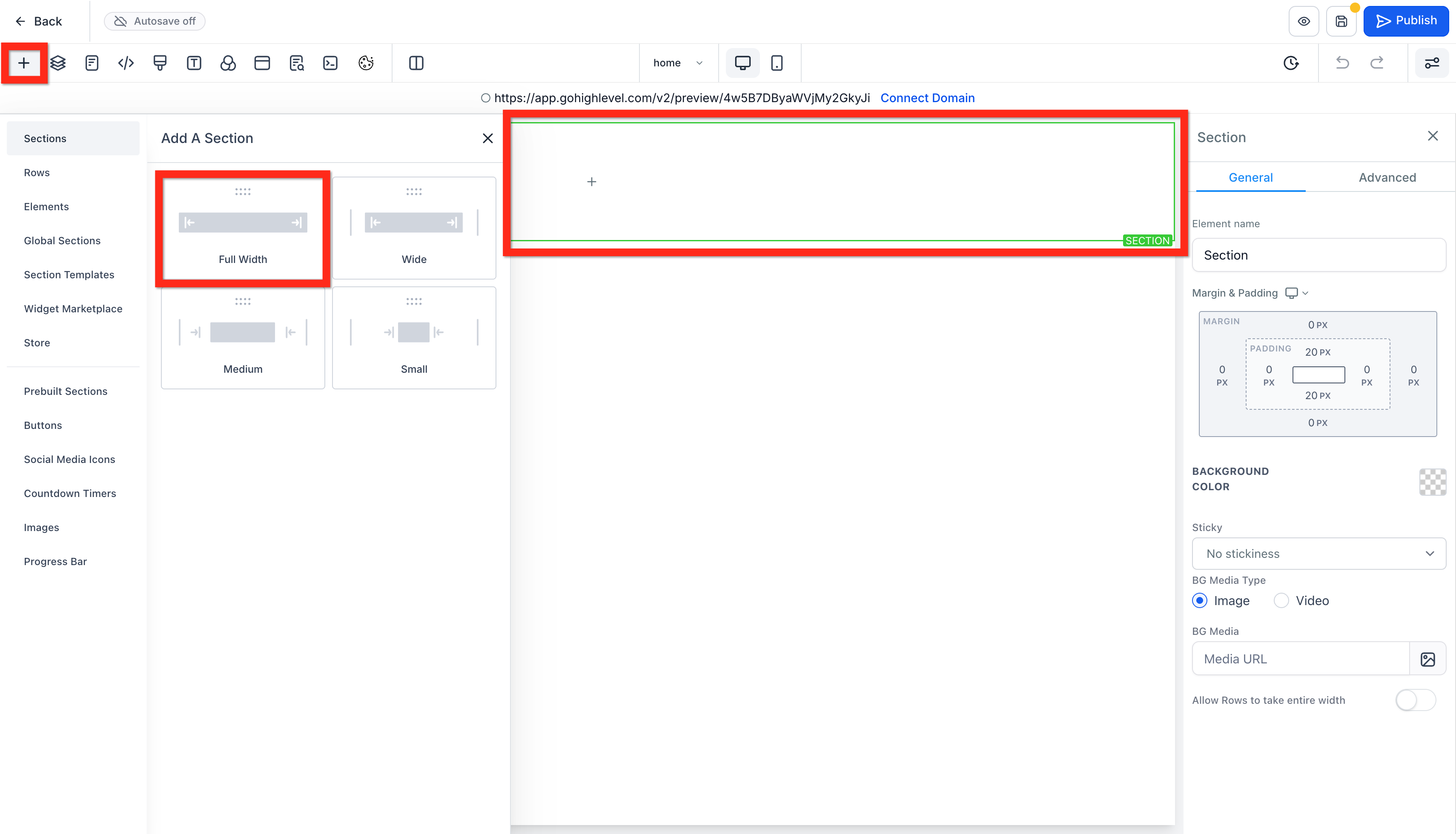
Add a Section
A section is the outer container for a chunk of your page. Click the + icon in the top left, choose Sections, and pick a width. Full Width is the standard choice for most homepage sections.
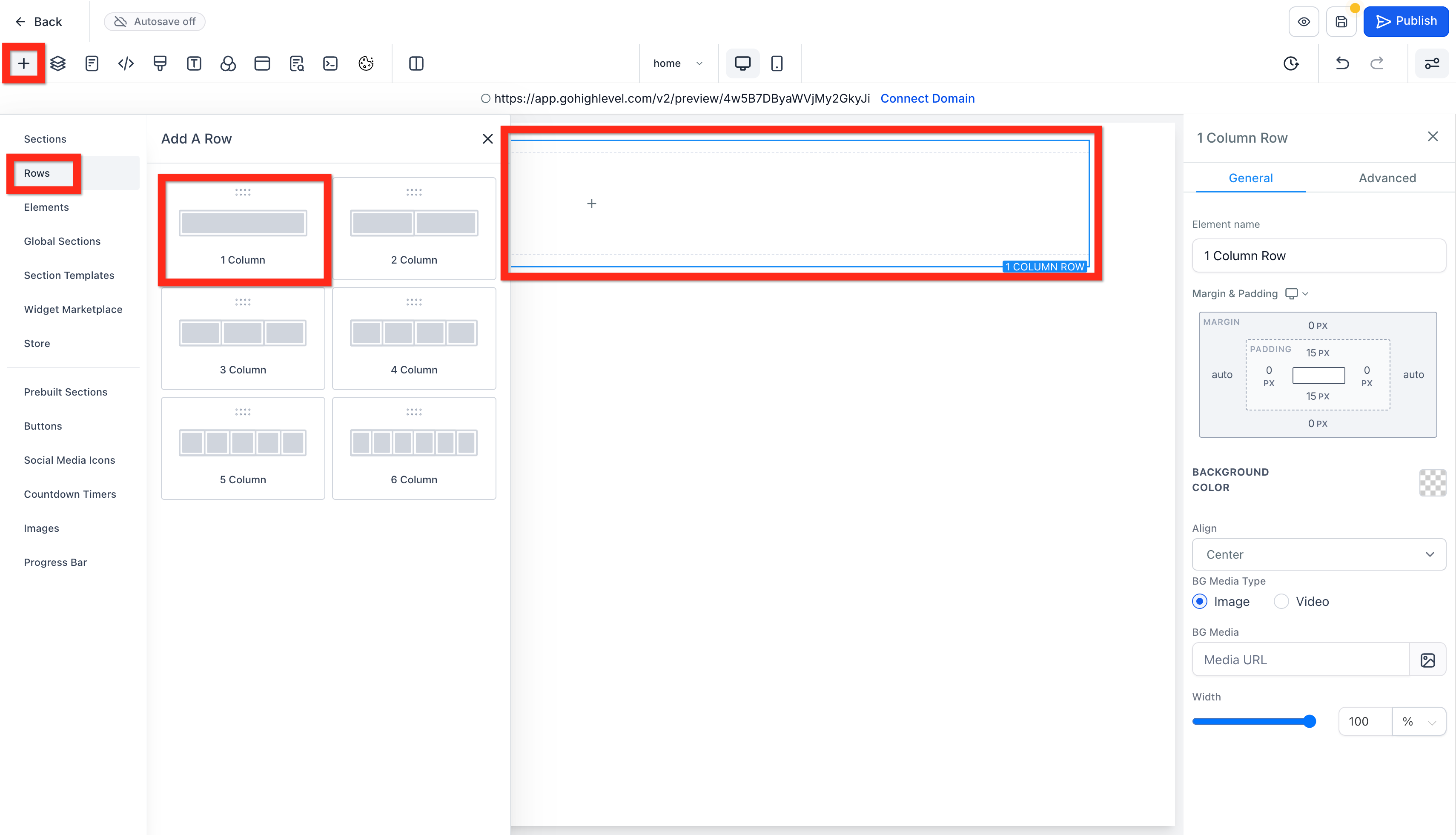
Add a Row
Inside your new section, add a Row. For a simple headline and call-to-action area, a 1 Column row is usually enough.
Add Your Headline and Sub-Headline
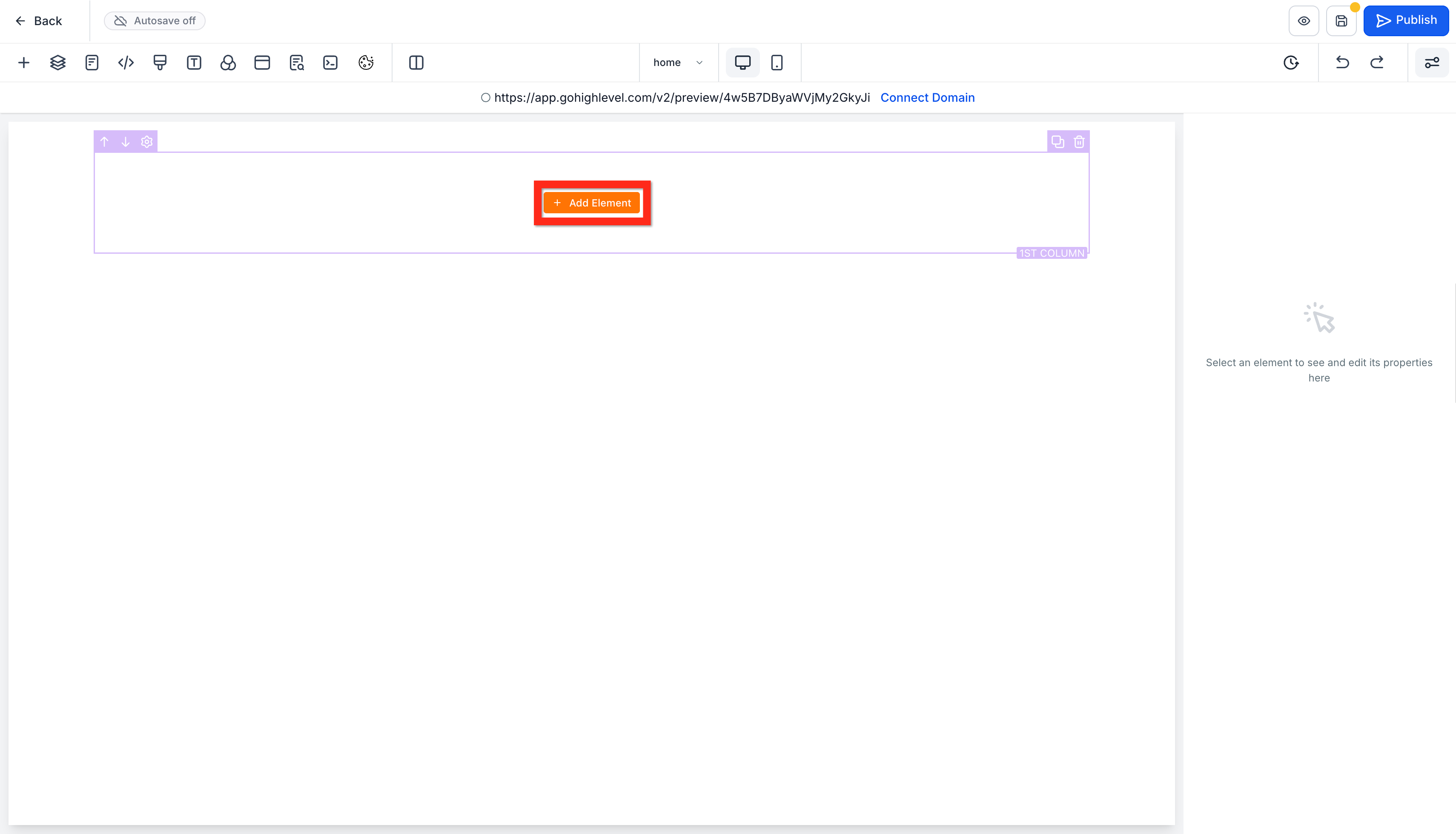
Click Add Element inside the row you just created.
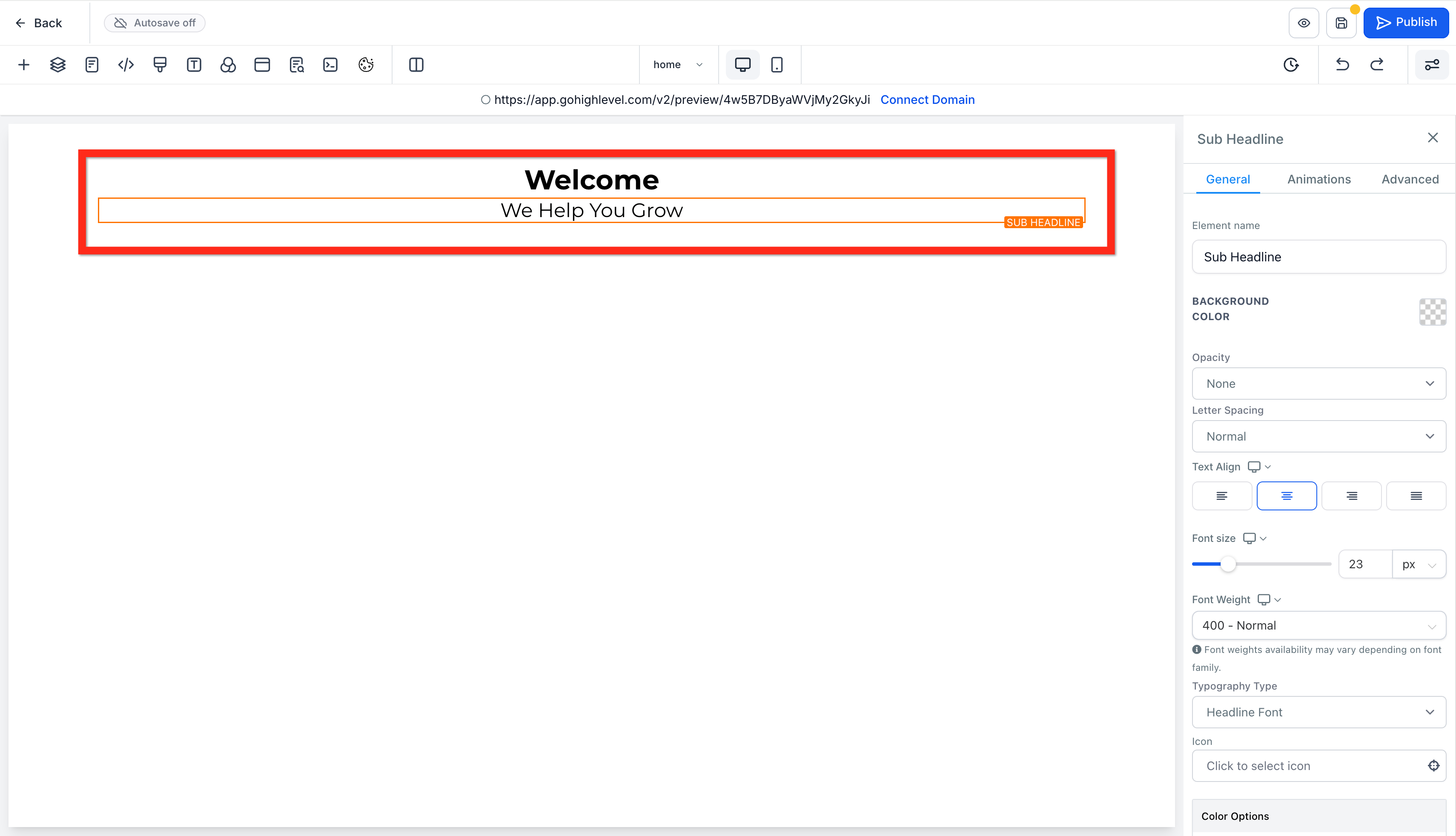
Drag in a Headline element and edit the text (something like "Welcome"). Then add a Sub-Headline underneath it and edit its text too (something like "We Help You Grow"). Use the right panel to adjust font size, alignment, and color until it matches your brand.
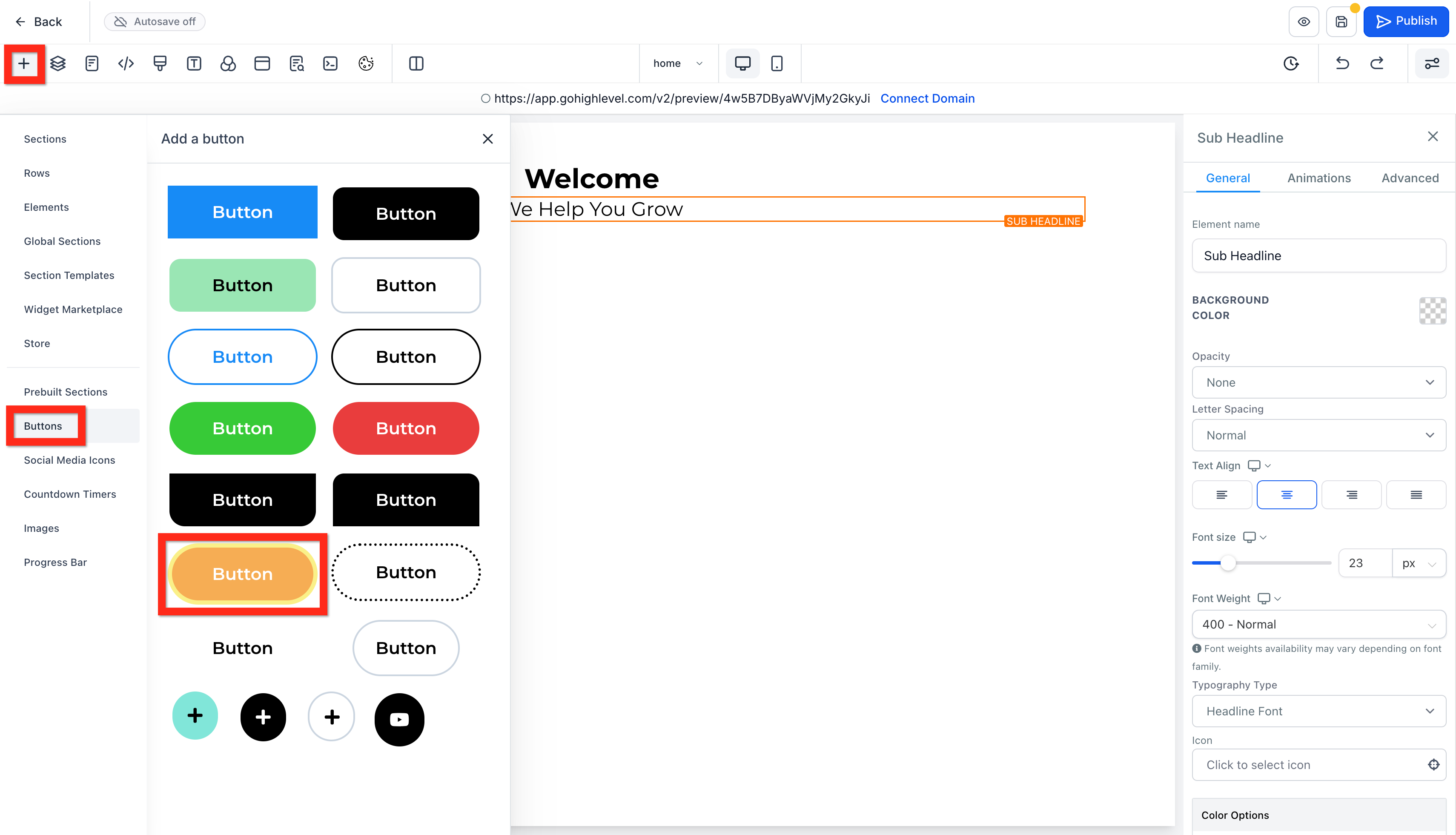
Add a Call-to-Action Button
Under your sub-headline, add a Button element. GoHighLevel gives you a range of pre-styled buttons to choose from, so pick one that fits your brand colors and edit the text to something action-oriented, like "Call Us Now" or "Book a Consultation."
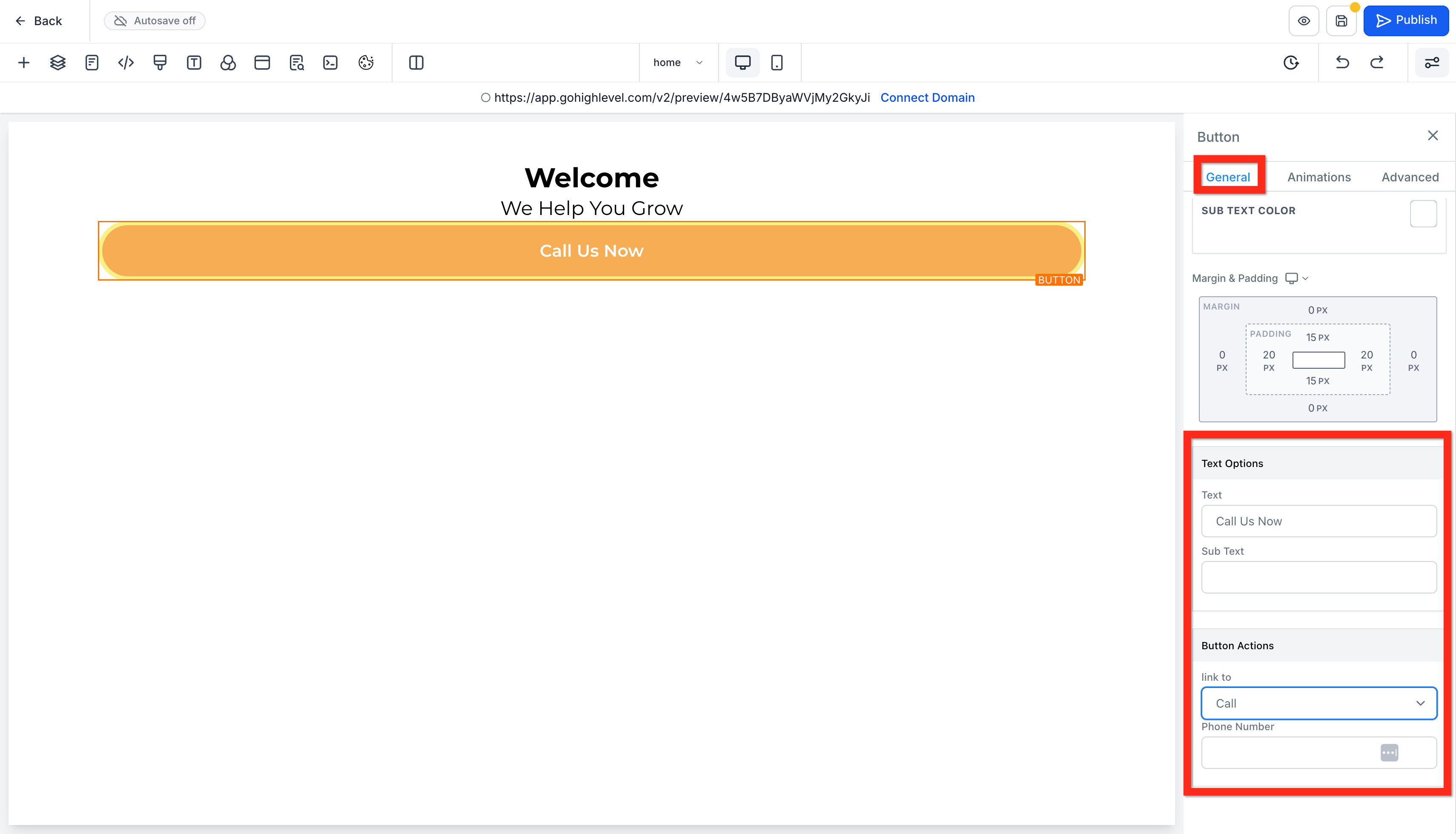
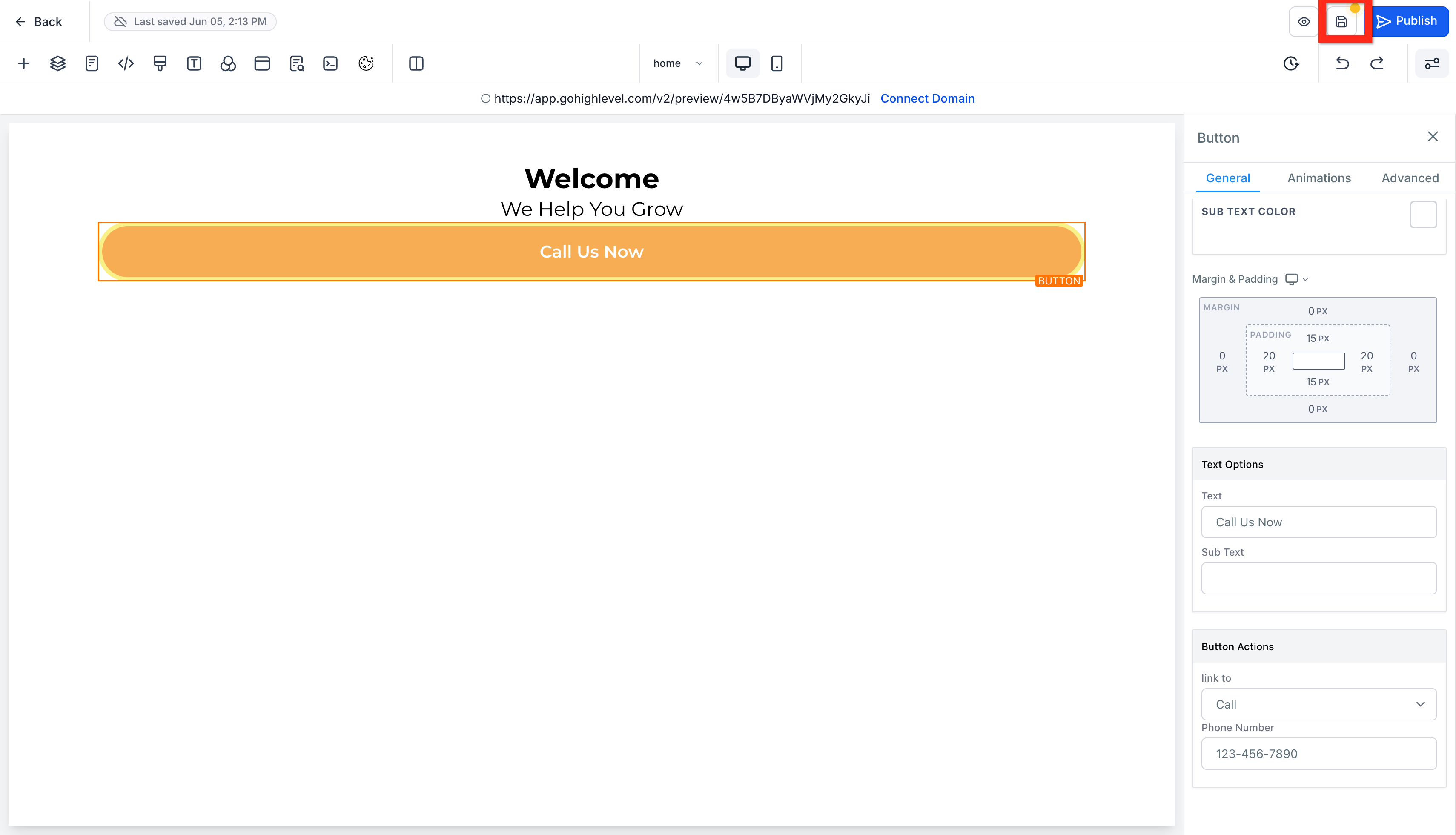
Then, in the button's settings on the right panel, scroll to Button Actions, set Link To as Call, and enter your business phone number. This means a tap on mobile dials you directly, which matters a lot in Nigeria where a large share of site visits happen on phones and people would rather call than fill out a form.
Keep repeating this pattern, sections, rows, elements, for the rest of your homepage: an about blurb, a services overview, testimonials, whatever your plan calls for.
Save Your Work
Click the save icon regularly as you build. GoHighLevel's autosave can be unreliable, so don't wait until you're finished to save for the first time.
Step 4: Add More Pages
Go back to Sites > Websites > Site Details and click Add New Page again. Name it (About Us, Services, Contact, whatever fits your plan), select Create From Blank, and repeat the same section-row-element process. Text blocks and image elements are usually enough for a straightforward About or Services page.
Step 5: Add Navigation and a Footer
A website without navigation just leaves visitors stuck on one page. Go back to the Home page editor and add a new full-width section above everything else. Inside it, add a 1-column row and drop in a Navigation Menu element. Click into it and make sure each link points to the correct page, then upload your logo.
Do the same thing at the bottom of the page with a full-width section, and this time use a prebuilt Footer from the Elements panel rather than building one from scratch. It'll usually include space for your contact details, social links, and a copyright line, and you can delete whatever you don't need.
Step 6: Preview, Check Mobile, and Publish
Before publishing, click the preview icon (the eye) to see the live version of your site, and use the mobile device toggle to check how it holds up on a phone screen. Since most Nigerian visitors will land on your site through mobile data rather than a desktop browser, this step isn't optional. If something looks cramped or broken on mobile, go back into the editor and adjust it, or duplicate the element and set one version to show on desktop only and the other on mobile only.
Once everything checks out, open the SEO settings (usually a small icon in the top toolbar) and fill in a page title and meta description so your site shows up properly in Google search results. Then hit Save one last time, followed by Publish.
If you own a custom domain, you can connect it under the site's Settings tab, which is also where you'll find options for a favicon, tracking codes, and a chat widget.
A Few Things Specific to Building in Nigeria
Payment can be a hurdle. GoHighLevel's official pricing starts around $97 a month, billed in dollars, which trips up a lot of Nigerian cards. Local resellers like GHL.ng, run by Hordanso, exist specifically to get around this by handling naira billing and setup so you're not fighting with international card declines just to start a trial.
Local support matters more than it sounds. GoHighLevel's own documentation and support are built for a global audience, and they're solid, but they won't know anything about running a business in Lagos or Abuja. GHL.ng's Knowledge Hub publishes more Nigeria-specific breakdowns of the platform, comparisons with tools like HubSpot, and pricing guidance, worth a look if you get stuck somewhere this guide doesn't cover.
WhatsApp is not optional here. Once your website is live, connect it to WhatsApp follow-up automation rather than relying on your contact form alone. A huge share of Nigerian customers expect to reach a business over WhatsApp, and GoHighLevel's automation tools handle that natively.
Naira payment collection. If you're planning to sell directly through your new site, look into Paystack integration so you can charge in naira, cedi, rand, or dollars depending on who's buying.
Frequently Asked Questions
Do I need to know how to code to build a website on GoHighLevel? No. The builder works entirely by dragging in sections, rows, and elements, then editing everything through the right-hand settings panel. If you can use a word processor, you can get through this. Custom code snippets are available if you want them later, but nothing in this guide requires touching a line of code.
How much does GoHighLevel cost, and can I pay with a Nigerian card? GoHighLevel's plans start around $97 a month billed directly in dollars, which is where a lot of Nigerian users hit a wall with failed or declined transactions. Local resellers such as GHL.ng handle naira billing and setup so you can start a free trial and pay without fighting an international card gateway.
Can I connect my own domain, or do I have to use the GoHighLevel preview link? You can connect a custom domain. Once your site is published, go to the site's Settings tab (outside the page editor) and you'll find the option to attach a domain you already own, along with settings for a favicon and tracking codes.
Will my website actually work well on mobile, since most of my visitors will be on phones? It can, but only if you check it. The builder has a mobile preview toggle right next to the desktop view, and it's worth switching to it after every major change rather than only at the end. If a specific element won't cooperate on mobile no matter what you do, duplicate it and set one copy to show on desktop only and the other on mobile only.
Do I need a separate tool for WhatsApp, or does GoHighLevel handle that too? GoHighLevel handles it natively. Once your site is live, you can route form submissions and button clicks into WhatsApp follow-up automations instead of relying only on email or a contact form, which matters given how many Nigerian customers expect to reach a business that way.
Wrapping Up
Building a website inside GoHighLevel isn't complicated once you understand the pattern: sections hold rows, rows hold elements, and everything gets styled through the right panel. The planning stage matters just as much as the building stage, so don't skip mapping out your pages before you start dragging in headlines.
For businesses in Nigeria specifically, the platform's real advantage isn't the website builder alone, it's that the same system handling your site is also handling your leads, your WhatsApp follow-ups, and your bookings. Get the website part right first, then build out the automation around it.